
Next.js has become the default framework for serious web applications — and the release of Next.js 16 has only cemented that position. With Turbopack as the default bundler, Cache Components replacing the confusing implicit caching, and React Compiler eliminating manual memoisation, the developer experience has taken a massive leap forward.
But here is the gap we keep seeing: plenty of tutorials show you how to get started, but very few cover how to architect a Next.js application that will not fall apart when you have 50 pages, 200 components, and a team of 8 developers working on it.
This guide covers the architecture patterns we use at Call O Buzz when building enterprise-grade Next.js applications. These come from shipping real production apps — not from reading documentation.
What Has Changed in Next.js 16
Before diving into patterns, let us quickly cover what is new. If you are coming from Next.js 14 or 15, these changes are significant.
Turbopack Is Now the Default
Turbopack, the Rust-based bundler that has been in development for years, is now the default for both next dev and next build. The numbers are real:
- 5-10x faster Fast Refresh during development
- 2-5x faster production builds compared to Webpack
- Filesystem caching stores compiler artifacts on disk — subsequent dev server starts are near-instant
If you have custom Webpack configs, the build will fail to prevent misconfigurations. You can opt out with --webpack, but the direction is clear — Turbopack is the future.
Cache Components and "use cache"
This is the biggest architectural change. The old implicit caching that confused everyone in Next.js 14 is gone. Caching is now entirely opt-in using the "use cache" directive:
// This component's output is cached
"use cache";

export default async function ProductList() {
  const products = await db.product.findMany();
  return <div>{products.map(p => <ProductCard key={p.id} product={p} />)}</div>;
}
Three variants exist:
"use cache"— Standard caching with in-memory LRU storage"use cache: remote"— Output stored in a remote cache (useful for multi-region)"use cache: private"— Cached only in browser memory (allows access tocookies()andheaders())
This completes the Partial Prerendering (PPR) story. Static shells are served instantly from the edge while dynamic content streams in.
proxy.ts Replaces middleware.ts
The middleware.ts file has been renamed to proxy.ts to clarify its purpose. It now runs on the Node.js runtime only (no more Edge runtime). A codemod is available:
npx @next/codemod middleware-to-proxy
React 19.2 and the React Compiler
Next.js 16 ships with React 19.2 which brings View Transitions, the Activity component, and performance DevTools. The React Compiler reached 1.0 and is now stable — it automatically handles memoisation, eliminating the need for useMemo, useCallback, and React.memo.
Built-in MCP for AI Agents
Next.js 16 includes a built-in MCP endpoint at /_next/mcp that AI coding tools (Claude Code, Cursor, Gemini CLI) can connect to for error retrieval, route listing, and natural language codemods.
 Next.js 16 layered architecture showing proxy.ts, Server Components, Cache Components, and database layers
Project Structure That Actually Scales
The default Next.js structure works for small projects. Once you cross 20 pages and 50 components, you need something more intentional.
Here is the structure we use — influenced by Feature-Sliced Design principles:
src/
├── app/                        # App Router — pages and layouts
│   ├── (marketing)/           # Route group: public pages
│   │   ├── page.tsx           # Home
│   │   ├── about/
│   │   ├── blog/
│   │   └── layout.tsx         # Marketing layout (header + footer)
│   ├── (dashboard)/           # Route group: authenticated pages
│   │   ├── dashboard/
│   │   ├── settings/
│   │   └── layout.tsx         # Dashboard layout (sidebar)
│   ├── (auth)/                # Route group: auth pages
│   │   ├── login/
│   │   ├── register/
│   │   └── layout.tsx         # Minimal centered layout
│   ├── api/                   # API routes
│   ├── proxy.ts               # Replaces middleware.ts in Next.js 16
│   ├── layout.tsx             # Root layout
│   ├── not-found.tsx
│   └── error.tsx
├── components/
│   ├── ui/                    # Primitives (Button, Input, Modal)
│   ├── features/              # Feature-specific components
│   │   ├── tickets/
│   │   ├── users/
│   │   └── notifications/
│   └── layouts/               # Header, Footer, Sidebar
├── lib/                       # Business logic and utilities
│   ├── actions/               # Server Actions
│   ├── api/                   # API client functions
│   ├── db/                    # Database utilities
│   ├── auth/                  # Auth helpers
│   └── utils/                 # General helpers
├── hooks/                     # Custom React hooks
├── types/                     # TypeScript definitions
└── config/                    # App configuration
Why This Structure Works
Route groups eliminate layout conflicts. The (marketing), (dashboard), and (auth) folders let you use completely different layouts for different sections. Marketing pages get a full header and footer. The dashboard gets a sidebar. Auth pages get a minimal centered layout. No awkward conditional rendering.
Colocate or centralise — pick one per category. Page-specific components live next to their page (colocated). Shared components live in components/. A component used only on the tickets page lives in app/(dashboard)/tickets/. A Button used everywhere lives in components/ui/.
The lib directory is your business logic layer. Database queries, API calls, validation, business rules — all separate from UI components. This makes testing straightforward and prevents your components from becoming 500-line monsters.
According to this analysis by Bits and Pieces, scattering business concepts across multiple folders is the number one anti-pattern in large Next.js codebases. Co-locate related files by feature.
Server Components: The Default Mental Model
In the App Router, every component is a Server Component unless you add "use client". This is fundamental — get this right and everything else follows.
Server Components Handle Data
// This runs on the server — no "use client" needed
// Database access, file reads, API calls — all on the server
// Its JavaScript is NEVER sent to the browser
export default async function TicketList() {
  const tickets = await db.ticket.findMany({
    where: { status: "open" },
    orderBy: { createdAt: "desc" },
    take: 50,
  });

  return (
    <div>
      <h2>Open Tickets</h2>
      {tickets.map((ticket) => (
        <TicketCard key={ticket.id} ticket={ticket} />
      ))}
    </div>
  );
}
Server Components send HTML to the browser, not JavaScript. This means faster page loads, smaller bundles, and direct database access without API endpoints.
Client Components Handle Interactivity
Add "use client" only when you need event handlers, browser APIs, or React hooks:
"use client";

import { useState } from "react";

export function TicketFilter({ onFilterChange }: { onFilterChange: (filter: string) => void }) {
  const [selected, setSelected] = useState("all");

  return (
    <select
      value={selected}
      onChange={(e) => {
        setSelected(e.target.value);
        onFilterChange(e.target.value);
      }}
    >
      <option value="all">All Tickets</option>
      <option value="open">Open</option>
      <option value="closed">Closed</option>
    </select>
  );
}
The Composition Pattern
Server Components can render Client Components (not the other way around). Push "use client" as far down the component tree as possible:
// Server Component — fetches data, renders the page structure
export default async function TicketPage() {
  const tickets = await getTickets();
  const categories = await getCategories();

  return (
    <div>
      <TicketFilter categories={categories} />  {/* Client — interactive */}
      <TicketList tickets={tickets} />           {/* Server — data heavy */}
      <TicketNotifications />                    {/* Client — real-time */}
    </div>
  );
}
Vercel's own blog highlights that the most common App Router mistake is adding "use client" to every file. This defeats the biggest advantage of the architecture.
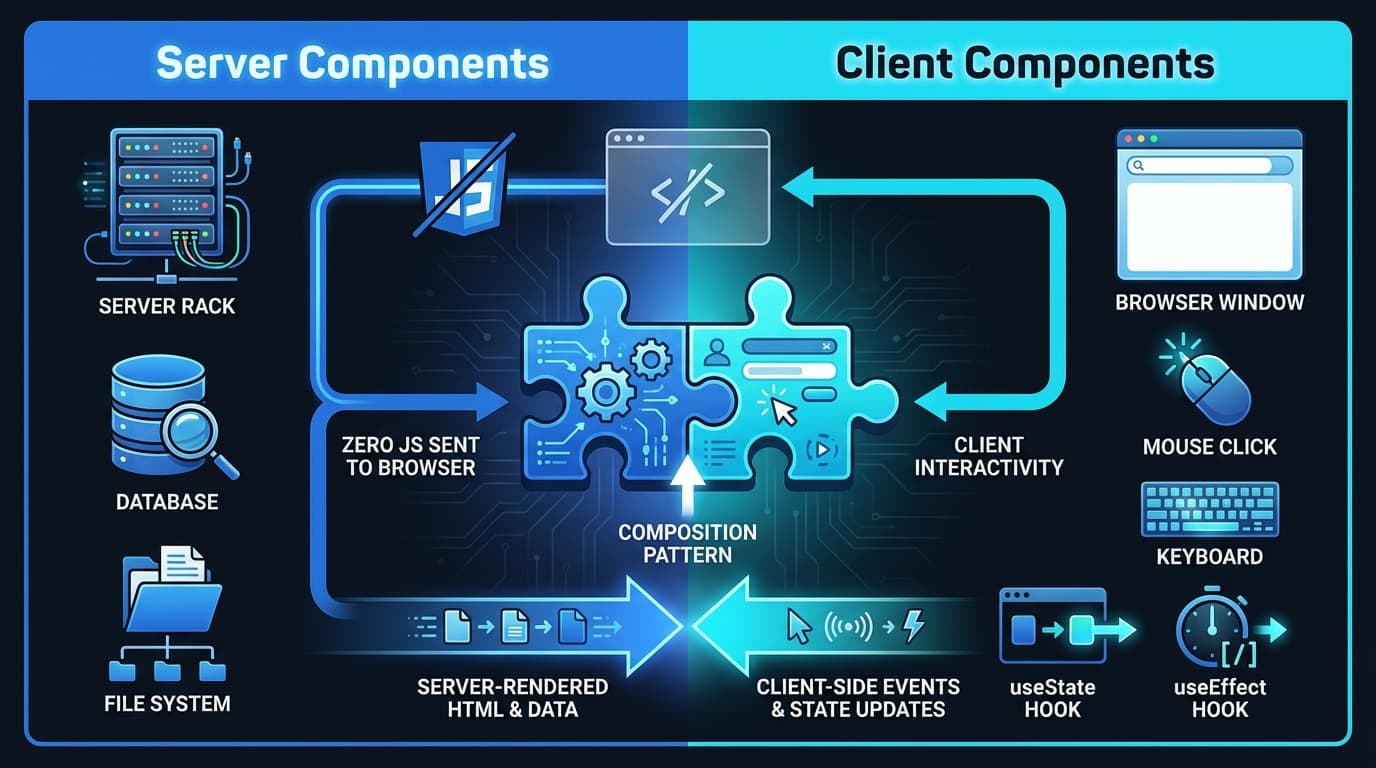 Server Components vs Client Components — server handles data, client handles interactivity
Data Fetching Patterns That Work
Data fetching in the App Router is completely different from the old getServerSideProps era. Here are the patterns you need.
Pattern 1: Direct Database Access
The simplest and most performant pattern. No API layer needed.
// app/(dashboard)/dashboard/page.tsx
import { db } from "@/lib/db";

export default async function DashboardPage() {
  const stats = await db.query(`
    SELECT
      COUNT(*) FILTER (WHERE status = 'open') as open_tickets,
      COUNT(*) FILTER (WHERE status = 'closed') as closed_tickets,
      AVG(EXTRACT(EPOCH FROM (resolved_at - created_at))) as avg_resolution_secs
    FROM tickets
    WHERE created_at > NOW() - INTERVAL '30 days'
  `);

  return <DashboardStats stats={stats} />;
}
Pattern 2: Parallel Data Fetching
When a page needs multiple independent pieces of data, fetch them in parallel. Never create a waterfall.
export default async function DashboardPage() {
  // GOOD — all three run simultaneously
  const [tickets, users, metrics] = await Promise.all([
    getTickets(),
    getUsers(),
    getMetrics(),
  ]);

  return (
    <div>
      <MetricsPanel metrics={metrics} />
      <TicketList tickets={tickets} />
      <TeamMembers users={users} />
    </div>
  );
}
Pattern 3: Streaming with Suspense
Your dashboard metrics might load in 50ms, but the analytics chart might take 2 seconds. Show what you have, stream the rest:
import { Suspense } from "react";

export default function DashboardPage() {
  return (
    <div>
      <DashboardHeader />  {/* Renders immediately */}

      <div className="grid grid-cols-3 gap-4">
        <Suspense fallback={<StatsSkeleton />}>
          <QuickStats />           {/* Fast — fills in quickly */}
        </Suspense>

        <Suspense fallback={<ChartSkeleton />}>
          <AnalyticsChart />       {/* Slow — streams when ready */}
        </Suspense>

        <Suspense fallback={<ActivitySkeleton />}>
          <RecentActivity />       {/* Another slow section */}
        </Suspense>
      </div>
    </div>
  );
}
The user sees the page layout immediately. Fast sections fill in within milliseconds. Slow sections show a skeleton and stream in. No blank white screen. No full-page spinner.
Pattern 4: Server Actions for Mutations
Server Actions handle form submissions and data mutations. They run on the server but can be called from Client Components:
// lib/actions/tickets.ts
"use server";

import { revalidatePath } from "next/cache";
import { db } from "@/lib/db";
import { z } from "zod";

const CreateTicketSchema = z.object({
  title: z.string().min(5).max(200),
  description: z.string().min(10),
  priority: z.enum(["low", "medium", "high", "critical"]),
  category: z.enum(["IT", "HR", "Facilities"]),
});

export async function createTicket(formData: FormData) {
  const parsed = CreateTicketSchema.safeParse({
    title: formData.get("title"),
    description: formData.get("description"),
    priority: formData.get("priority"),
    category: formData.get("category"),
  });

  if (!parsed.success) {
    return { error: parsed.error.flatten().fieldErrors };
  }

  await db.ticket.create({ data: parsed.data });
  revalidatePath("/dashboard/tickets");
  return { success: true };
}
// components/features/tickets/CreateTicketForm.tsx
"use client";

import { useActionState } from "react";
import { createTicket } from "@/lib/actions/tickets";

export function CreateTicketForm() {
  const [state, formAction, isPending] = useActionState(createTicket, null);

  return (
    <form action={formAction}>
      <input name="title" placeholder="What do you need help with?" />
      {state?.error?.title && <p className="text-red-500">{state.error.title}</p>}

      <textarea name="description" placeholder="Describe the issue..." />

      <select name="priority">
        <option value="medium">Medium</option>
        <option value="low">Low</option>
        <option value="high">High</option>
        <option value="critical">Critical</option>
      </select>

      <button type="submit" disabled={isPending}>
        {isPending ? "Creating..." : "Create Ticket"}
      </button>
    </form>
  );
}
The form works progressively — it functions even without JavaScript. Always validate with Zod on the server side as recommended by the Next.js security guidelines.
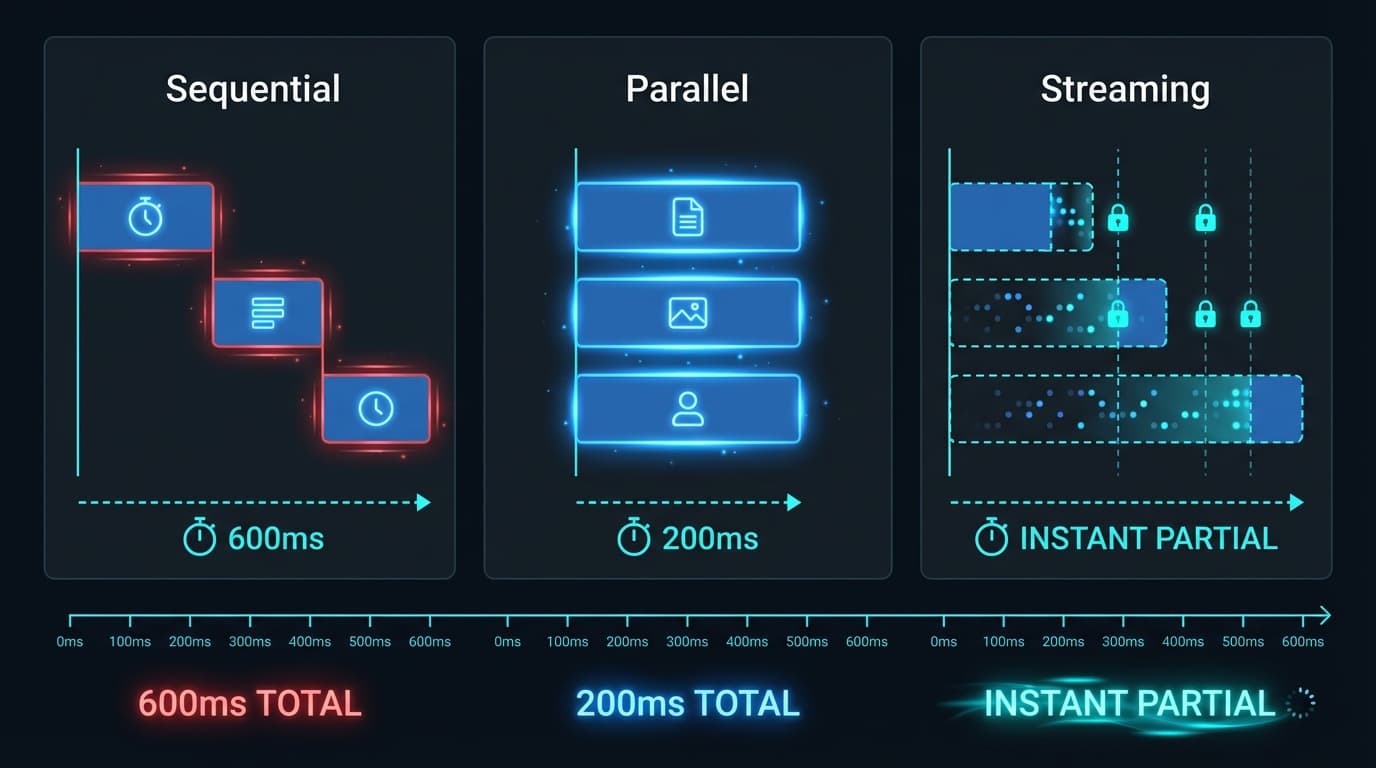 Data fetching patterns comparison — sequential waterfall vs parallel vs streaming with Suspense
Caching: Finally Makes Sense in Next.js 16
The caching story in Next.js 14 and early 15 was confusing — aggressive defaults, unexpected behaviour, and too much magic. Next.js 16 fixed this with explicit, opt-in caching via Cache Components.
The New Caching Model
No caching by default. In Next.js 16, fetch requests are not cached unless you explicitly opt in. Dynamic pages render fresh on every request.
Opt-in with "use cache":
// Entire page cached
"use cache";

import { cacheLife } from "next/cache";

export default async function ProductsPage() {
  cacheLife("hours"); // Cache for 1 hour
  const products = await getProducts();
  return <ProductGrid products={products} />;
}
// Only a specific component cached
import { unstable_cacheTag as cacheTag } from "next/cache";

async function PricingTable() {
  "use cache";
  cacheTag("pricing");
  const plans = await getPlans();
  return <Table data={plans} />;
}
Cache Variants
| Variant | Where It Caches | Use Case |
|---|---|---|
"use cache" | Server (LRU memory) | Standard pages and components |
"use cache: remote" | Remote cache (Redis, CDN) | Multi-region deployments |
"use cache: private" | Browser only | Personalised content with cookies/headers |
Revalidation
import { revalidatePath, revalidateTag } from "next/cache";

export async function updateTicket(id: string, data: TicketUpdate) {
  await db.ticket.update({ where: { id }, data });

  // Revalidate by path
  revalidatePath("/dashboard/tickets");
  revalidatePath(`/dashboard/tickets/${id}`);

  // Or by tag (more flexible)
  revalidateTag("tickets");
}
When to Cache What
| Content Type | Strategy | Example |
|---|---|---|
| Static content | "use cache" at build time | Blog posts, documentation |
| Semi-static | "use cache" with cacheLife("hours") | Product listings, team page |
| User-specific | No cache (dynamic render) | Dashboard, user profile |
| Personalised | "use cache: private" | User preferences, recommendations |
Authentication with proxy.ts
Next.js 16 renamed middleware.ts to proxy.ts. It runs before every request on the Node.js runtime — perfect for auth checks.
// proxy.ts (formerly middleware.ts)
import { NextRequest, NextResponse } from "next/server";
import { getSession } from "@/lib/auth";

const publicPaths = ["/", "/about", "/blog", "/contact", "/login", "/register"];

export async function middleware(request: NextRequest) {
  const { pathname } = request.nextUrl;

  // Allow public paths
  if (publicPaths.some((p) => pathname.startsWith(p))) {
    return NextResponse.next();
  }

  // Check session
  const session = await getSession(request);

  if (!session) {
    const loginUrl = new URL("/login", request.url);
    loginUrl.searchParams.set("redirect", pathname);
    return NextResponse.redirect(loginUrl);
  }

  // Pass user context downstream
  const response = NextResponse.next();
  response.headers.set("x-user-id", session.userId);
  response.headers.set("x-tenant-id", session.tenantId);
  return response;
}

export const config = {
  matcher: ["/((?!_next/static|_next/image|favicon.ico|public).*)"],
};
Layout-Level Auth
For dashboard layouts, verify the session and provide user context:
// app/(dashboard)/layout.tsx
import { redirect } from "next/navigation";
import { getSession } from "@/lib/auth";
import { Sidebar } from "@/components/layouts/Sidebar";

export default async function DashboardLayout({
  children,
}: {
  children: React.ReactNode;
}) {
  const session = await getSession();
  if (!session) redirect("/login");

  return (
    <div className="flex h-screen">
      <Sidebar user={session.user} />
      <main className="flex-1 overflow-auto p-6">{children}</main>
    </div>
  );
}
Error Handling That Does Not Annoy Users
Every App Router page that fetches data needs three companion files:
loading.tsx — Skeleton State
// app/(dashboard)/tickets/loading.tsx
export default function TicketsLoading() {
  return (
    <div className="space-y-4">
      {Array.from({ length: 5 }).map((_, i) => (
        <div key={i} className="h-20 rounded-lg bg-gray-800 animate-pulse" />
      ))}
    </div>
  );
}
error.tsx — Error Recovery
// app/(dashboard)/tickets/error.tsx
"use client";

export default function TicketsError({
  error,
  reset,
}: {
  error: Error & { digest?: string };
  reset: () => void;
}) {
  return (
    <div className="flex flex-col items-center justify-center p-8">
      <h2 className="text-xl font-bold text-red-500">Could not load tickets</h2>
      <p className="mt-2 text-gray-400">
        {error.message || "Something went wrong. Please try again."}
      </p>
      <button onClick={reset} className="mt-4 px-4 py-2 bg-blue-600 text-white rounded-lg">
        Try Again
      </button>
    </div>
  );
}
not-found.tsx — Missing Resources
// app/(dashboard)/tickets/[id]/not-found.tsx
import Link from "next/link";

export default function TicketNotFound() {
  return (
    <div className="flex flex-col items-center justify-center p-8">
      <h2 className="text-xl font-bold">Ticket Not Found</h2>
      <p className="mt-2 text-gray-400">
        This ticket may have been deleted or you may not have access.
      </p>
      <Link href="/dashboard/tickets" className="mt-4 text-blue-500 hover:underline">
        Back to Tickets
      </Link>
    </div>
  );
}
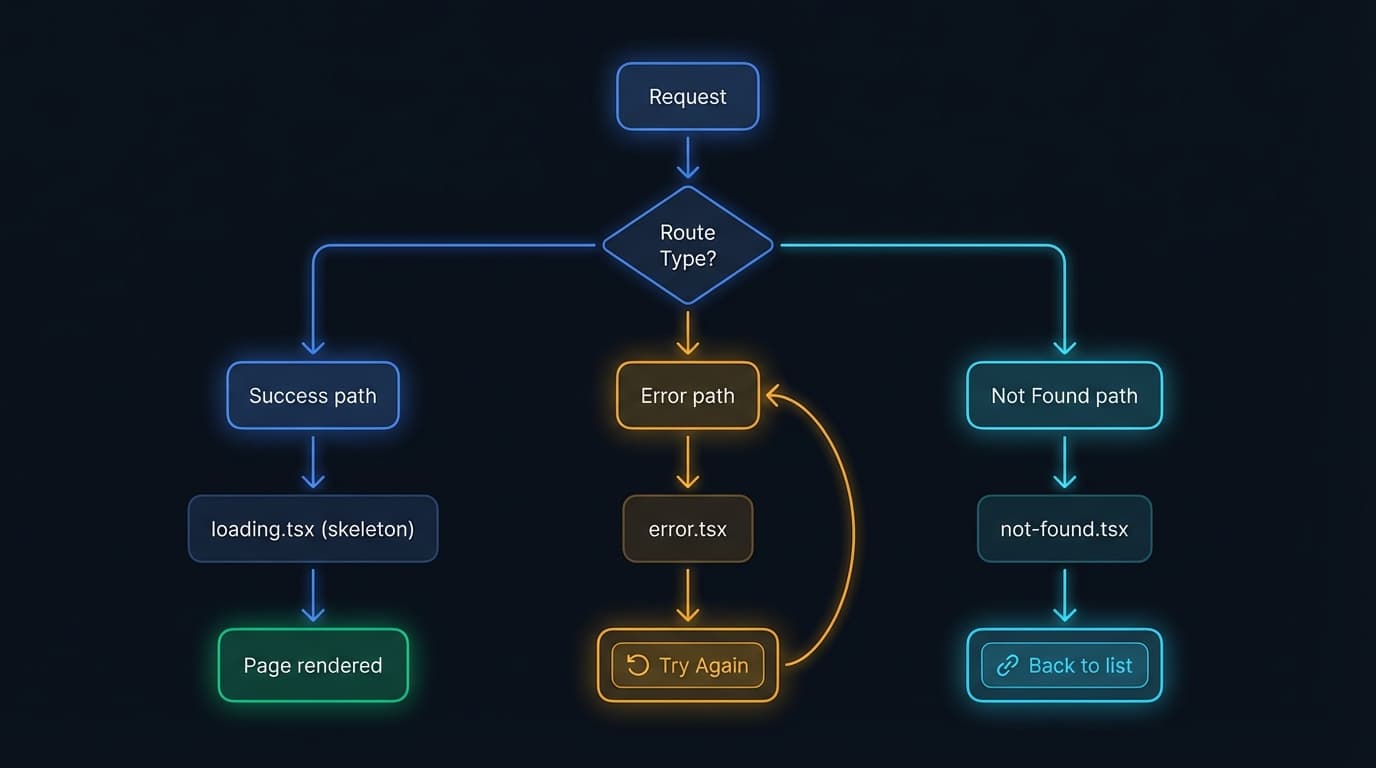 Next.js error handling flow — loading, error recovery, and not-found states
Performance Optimisation
Performance is not something you fix later — you build it in from the start. Here is what matters most in 2026.
React Compiler — Free Performance
The React Compiler is now stable (v1.0) and built into Next.js 16. It automatically handles memoisation — you can delete every useMemo, useCallback, and React.memo from your codebase.
// next.config.ts
const nextConfig = {
  experimental: {
    reactCompiler: true,
  },
};
That is it. The compiler analyses your components at build time and inserts memoisation where needed. Meta has been running it in production at scale.
Image Optimisation
Always use next/image — it handles responsive images, lazy loading, and WebP/AVIF conversion:
import Image from "next/image";

// Always specify dimensions for CLS (Cumulative Layout Shift)
<Image
  src="/images/hero.jpg"
  alt="Dashboard preview"
  width={1200}
  height={675}
  priority  // Load above-the-fold images immediately
  className="rounded-2xl"
/>

// For dynamic aspect ratios
<div className="relative aspect-video">
  <Image
    src={post.image}
    alt={post.imageAlt}
    fill
    className="object-cover rounded-lg"
    sizes="(max-width: 768px) 100vw, (max-width: 1200px) 50vw, 33vw"
  />
</div>
Bundle Size Management
// Lazy load heavy components
import dynamic from "next/dynamic";

const RichTextEditor = dynamic(() => import("@/components/RichTextEditor"), {
  loading: () => <div className="h-64 bg-gray-800 animate-pulse rounded-lg" />,
  ssr: false, // Browser-only component
});

const AnalyticsChart = dynamic(() => import("@/components/AnalyticsChart"), {
  loading: () => <ChartSkeleton />,
});
Metadata for SEO
Every page needs proper metadata. According to Google's latest guidelines, meta titles should be under 60 characters and descriptions under 160:
// app/blog/[slug]/page.tsx
import type { Metadata } from "next";

export async function generateMetadata({
  params,
}: {
  params: Promise<{ slug: string }>;
}): Promise<Metadata> {
  const { slug } = await params;
  const post = await getPost(slug);
  if (!post) return { title: "Post Not Found" };

  return {
    title: post.title,
    description: post.excerpt,
    openGraph: {
      title: post.title,
      description: post.excerpt,
      images: [{ url: post.image, width: 1200, height: 630 }],
      type: "article",
      publishedTime: post.date,
    },
  };
}
JSON-LD Structured Data
Google recommends embedding JSON-LD as a Server Component for better SEO:
export default async function BlogPost({ params }: { params: Promise<{ slug: string }> }) {
  const { slug } = await params;
  const post = await getPost(slug);

  const jsonLd = {
    "@context": "https://schema.org",
    "@type": "BlogPosting",
    headline: post.title,
    description: post.excerpt,
    datePublished: post.date,
    author: { "@type": "Person", name: post.author },
    publisher: { "@type": "Organization", name: "Call O Buzz Services" },
  };

  return (
    <>
      <script type="application/ld+json" dangerouslySetInnerHTML={{ __html: JSON.stringify(jsonLd) }} />
      <article>{/* post content */}</article>
    </>
  );
}
How Next.js 16 Compares to Alternatives
The framework landscape in 2026 is competitive. Here is an honest assessment:
| Framework | Best For | Bundle Size | Maturity |
|---|---|---|---|
| Next.js 16 | Full-stack apps, SaaS, dashboards | Improving (Turbopack) | Most mature |
| Astro 5/6 | Content sites, blogs, marketing | Smallest (zero JS default) | Growing fast |
| SvelteKit | Performance-critical apps | 20-40% smaller than React | Solid |
| Remix | Server-rendered React, simplicity | Lean | Part of React Router v7 |
| Qwik | Startup performance (resumability) | Near-zero hydration cost | Emerging |
State of JavaScript 2025 shows that while Next.js remains the most-used meta-framework (~68% of JS developers), positive sentiment has declined as alternatives like Astro and SvelteKit have matured.
Our take: Next.js remains the best choice for complex, full-stack applications — especially SaaS products. For content-heavy marketing sites, Astro is increasingly compelling. For performance-obsessed teams, SvelteKit with Svelte 5's Runes is worth evaluating.
Deployment in 2026
Vercel (Recommended for Most Teams)
Vercel remains the most seamless option with 119 points of presence, edge caching, and zero-config deployments. For Indian users, the Mumbai (bom1) region provides low latency.
Docker (Self-Hosted)
For self-hosting, enable standalone output and use a multi-stage Dockerfile:
// next.config.ts
const nextConfig = {
  output: "standalone",
};
FROM node:20-alpine AS base

FROM base AS deps
WORKDIR /app
COPY package.json package-lock.json ./
RUN npm ci --omit=dev

FROM base AS builder
WORKDIR /app
COPY --from=deps /app/node_modules ./node_modules
COPY . .
RUN npm run build

FROM base AS runner
WORKDIR /app
ENV NODE_ENV=production
RUN addgroup --system --gid 1001 nodejs
RUN adduser --system --uid 1001 nextjs
COPY --from=builder /app/public ./public
COPY --from=builder --chown=nextjs:nodejs /app/.next/standalone ./
COPY --from=builder --chown=nextjs:nodejs /app/.next/static ./.next/static
USER nextjs
EXPOSE 3000
CMD ["node", "server.js"]
This produces a self-contained build under 150MB — no node_modules needed in production.
Cloudflare Workers
Cloudflare is deprecating Pages in favour of Workers with Static Assets. Workers now handle full-stack apps in a single deployment with millisecond cold starts.
Testing Strategies
Unit Tests for Business Logic
Keep business logic in lib/ and test it independently:
import { calculateSLAStatus } from "@/lib/utils/ticket";

describe("calculateSLAStatus", () => {
  it("returns breached when past deadline", () => {
    const created = new Date("2026-01-01T10:00:00");
    const now = new Date("2026-01-01T14:00:00");
    expect(calculateSLAStatus(created, now, 2)).toBe("breached");
  });
});
E2E Tests with Playwright
For critical user flows, use Playwright:
import { test, expect } from "@playwright/test";

test("user can create a support ticket", async ({ page }) => {
  await page.goto("/login");
  await page.fill("[name=email]", "test@example.com");
  await page.fill("[name=password]", "testpass");
  await page.click("button[type=submit]");

  await page.goto("/dashboard/tickets/new");
  await page.fill("[name=title]", "AC not working in conference room");
  await page.selectOption("[name=category]", "Facilities");
  await page.click("button[type=submit]");

  await expect(page.getByText("AC not working in conference room")).toBeVisible();
});
Common Mistakes We See in 2026
After reviewing dozens of Next.js codebases, these keep coming up:
-
Making everything a Client Component. If
"use client"is in most of your files, you are losing the biggest advantage of the App Router. Vercel's official blog calls this the number one mistake. -
Not using route groups. Without
(marketing),(dashboard), and(auth), you end up with one layout trying to handle every page type — leading to layout flicker and unnecessary re-renders. -
Fetching data with
useEffectwhen a Server Component would work. If you are calling an API on mount, ask yourself — can this be a Server Component? Nine times out of ten, yes. -
Missing loading and error states. Every dynamic page needs
loading.tsxanderror.tsx. Without them, users see white screens and cryptic errors. -
Sequential
awaitcalls creating waterfalls. UsePromise.allfor independent data fetches. A page with three sequential 200ms queries takes 600ms. In parallel, it takes 200ms. -
Still using
middleware.ts. It works but is deprecated. Migrate toproxy.tswith the official codemod. -
Not enabling the React Compiler. It is stable, free, and eliminates entire categories of performance bugs. Turn it on.
-
Exposing secrets to the client. Only environment variables prefixed with
NEXT_PUBLIC_are sent to the browser. If you accidentally expose a database URL or API key without the prefix, you have a security incident.
Key Takeaways
- Server Components are the default — use
"use client"sparingly "use cache"replaces implicit caching — caching is now opt-in and predictableproxy.tsreplacesmiddleware.ts— runs on Node.js runtime only- React Compiler handles memoisation — delete your
useMemoanduseCallback - Turbopack is the default bundler — 2-5x faster builds
- Parallel data fetching with
Promise.all— never create waterfalls - Streaming with Suspense — show partial content instead of spinners
- JSON-LD schema for SEO — embedded as Server Components
These are not exotic patterns — they are practical approaches that work for teams of all sizes. Start with good structure, choose the right rendering strategy per page, and build in error handling from day one.
Building an enterprise Next.js application? Talk to us about architecture reviews, performance audits, and development partnerships. We have been shipping production Next.js apps since the Pages Router days.
SV
Founder, Call O Buzz Services